Start with charging locations that the exact car can use
A nationwide cents-per-kWh ranking would create false precision. Electrify America says its DC fast-charging price depends on charger location, plan, energy delivered, and sometimes time of use. EVgo says rates vary by region and directs drivers to station-specific plan prices. Tesla shows each Supercharger site's price in its app. At ChargePoint-managed stations, the independent station owner or roaming partner can set the charging price.
Build the comparison around real travel needs. For a commute backup, identify two compatible nearby sites. For a recurring highway trip, record a preferred stop and an independent backup in each direction. At each site note the operator, connector the exact vehicle can use, physical port count, reported power, access method, posted energy or time rate, session fee, idle or congestion rule, parking charge, tax treatment, and check time. A lower price at an incompatible, restricted, or badly placed station has no value.
The ev.guru station finder can identify registered U.S. locations, physical ports, connectors, and reported power. It does not claim current operation, occupancy, or price. Use it to form a shortlist, then verify the exact station in the operator's current app, charger screen, or supported payment flow. The route planner can compare a selected stop and its two route legs; it is not a live-status or multi-stop optimizer.

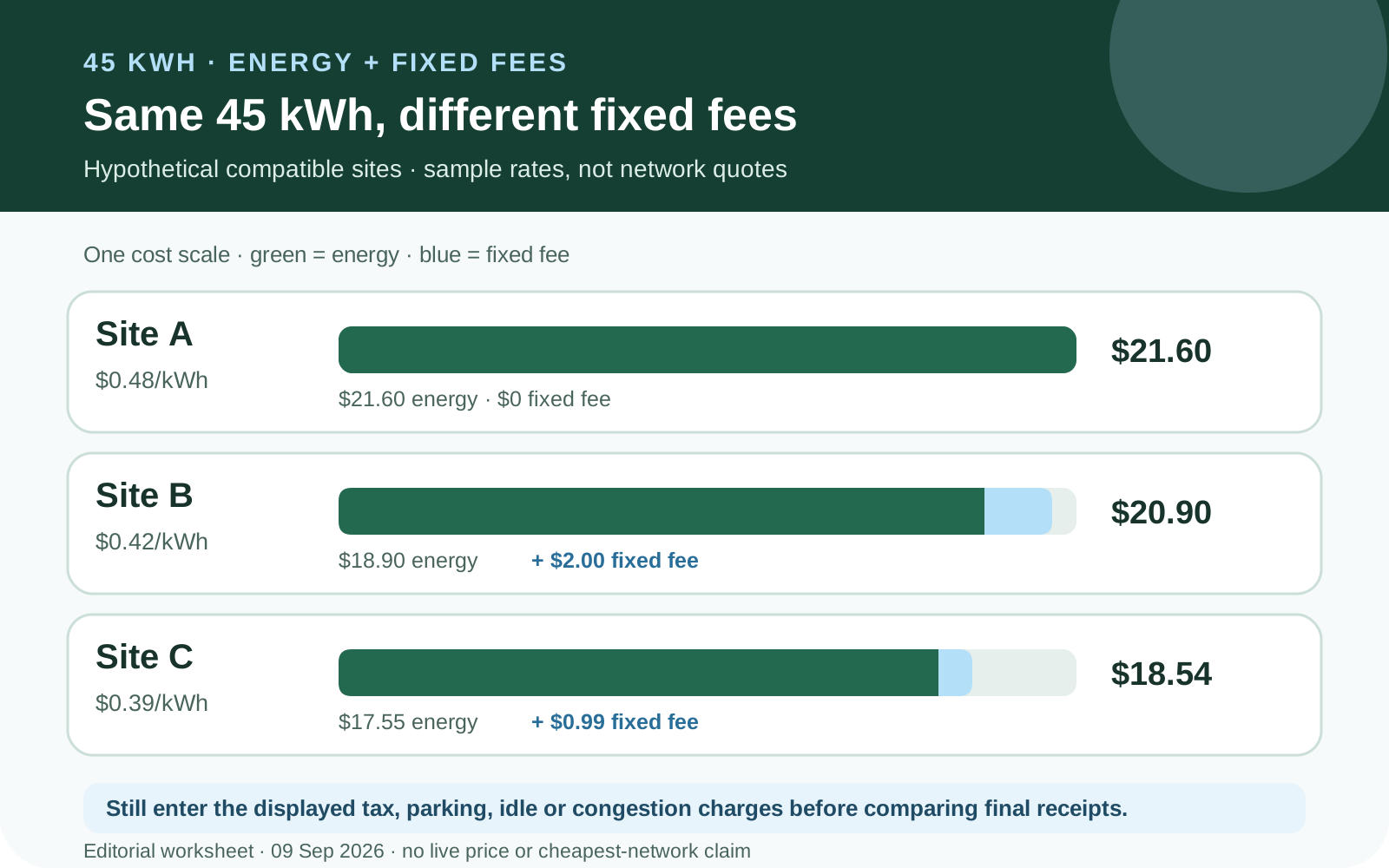
The same hypothetical 45-kWh stop: energy and fixed fees shown separately. Add actual tax, parking, idle and congestion charges to compare final receipts. ev.guru · AI-assisted charging worksheet · Original editorial illustration
Read the entire price screen before starting
A charging bill can contain more than an energy charge. Keep separate lines for billed kWh, per-kWh rate, connected-time or active-time rate, session or transaction fee, membership fee, idle or congestion fee, parking, and applicable taxes. Leave an unknown line blank until the operator shows it; never turn a missing fee into zero.
ChargePoint's official fee glossary shows why the labels matter. An independently owned station can charge by kWh, connected time, a flat session fee, minimum or maximum amount, or an overstay rate. ChargePoint separately identifies platform service, guest, and convenience fees as its own charges rather than station-owner energy prices. Free charging means the station owner has not set a charging fee; it does not establish free parking or unrestricted access.
This hypothetical comparison uses the same 45 billed kWh at three compatible sites. Tax, parking, and idle costs remain open inputs, and the displayed rates are examples rather than network quotes. For a 10-kWh top-up, A becomes $4.80, B becomes $6.20, and C becomes $4.89. The $2 fixed fee reverses the result between A and B even though B has the lower energy rate. Taxes can reverse a small difference too, so compare the completed receipt rather than declaring a winner from one line item.
| Site · $/kWh | Energy $ | Fixed fee $ | Subtotal $ |
|---|---|---|---|
| A · 0.48 | 21.60 | 0.00 | 21.60 |
| B · 0.42 | 18.90 | 2.00 | 20.90 |
| C · 0.39 | 17.55 | 0.99 | 18.54 |
Sources: [6]
Electrify America: record the values for that site
Electrify America publishes no single national DC fast-charging rate. Its public pricing page says price is determined by charger location, plan, and energy delivered; selected stations also use time-of-use pricing. Real-time price, power, and idle details appear in the app or on the charger. Guest card payment and app payment through Pass or Pass+ are separate access routes.
The public page advertises about 25 percent savings for Pass+, but that wording is not a fixed discount instruction. Copy three values on the same date: the regular price at sites you use, the Pass+ price there, and the current monthly fee shown in the app. If the hypothetical inputs were $0.56/kWh, $0.43/kWh, and $7/month, the energy-only break-even would be $7 divided by $0.13, or 53.85 eligible kWh. Replace every input instead of mechanically reducing all observed prices by 25 percent.
Electrify America states that charging, idling, and applicable taxes are charged after the session. Its FAQ currently describes a ten-minute grace period after charging ends, followed by a $0.40-per-minute idle fee. Thirty idle minutes after the grace period would add $12.00. The charger screen is the controlling place to check the current rule. A temporary card authorization is not the final charge, so reconcile the completed receipt with delivered kWh. A cheaper time-of-use period matters only if the exact station offers it and the trip can use it.
EVgo: session count can matter as much as energy
EVgo's public page lists Pay As You Go at $0/month with a $0.99 session fee, Plus at $6.99/month with no session fee, and PlusMax at $12.99/month with no session fee. A session initiated directly by credit card carries a $2.99 transaction fee. EVgo says station-specific plan pricing appears in its app, rates vary by region, and pricing may be subject to tax. Its advertised savings are up to 15 percent for Plus and 30 percent for PlusMax, with actual savings depending on time, location, frequency, and session length.
The table combines those official fixed fees with hypothetical station energy rates of $0.55/kWh for Pay As You Go and $0.48/kWh for Plus. The 160-kWh row is 160 × $0.55 + 4 × $0.99 = $91.96 versus 160 × $0.48 + $6.99 = $83.79. One small stop reverses the result. At 80 kWh, changing two sessions to eight changes only Pay As You Go's session-fee exposure. The subscription fee is not charging credit and must be added once even if only one eligible session occurs.
EVgo does not publish one national tax percentage for this example. Copy tax from the station display or receipt and keep it on its own line. Do not apply a home sales-tax assumption to a session in another state. All table totals are before tax and other site costs.
| Use case | kWh / sessions | Pay As You Go $ | Plus $ |
|---|---|---|---|
| Road-trip month | 160 / 4 | 91.96 | 83.79 |
| One small stop | 20 / 1 | 11.99 | 16.59 |
| Same 80 kWh · few stops | 80 / 2 | 45.98 | 45.39 |
| Same 80 kWh · many stops | 80 / 8 | 51.92 | 45.39 |
Sources: [3]
Tesla: eligibility, price, and congestion are linked
Non-Tesla access applies only to eligible sites and compatible vehicles. Tesla says Supercharging is accessible to a vehicle with a NACS inlet and to a CCS1 vehicle using a NACS DC adapter supplied by Tesla or the vehicle manufacturer; third-party adapters are prohibited. The app identifies participating locations and prices. Cable reach can also depend on inlet position, so compatibility and access come before price. How to check the connector and adapter path for your exact car is explained in “J3400/NACS, CCS1, or J1772? Verify compatibility before buying”.
Tesla says each Supercharger site price appears in the app and can change over time. A price charged through another party's app may differ. Prices shown in Tesla's app include normal taxes and fees, while choices during or after charging can add congestion fees. Plug-in time determines the session rate, and some sites have peak and off-peak rates.
A non-Tesla membership applies the Tesla-vehicle price through the Tesla app at select sites. Tesla's Payment Terms limit it to Tesla-owned Superchargers and no more than five Supercharger sessions per account per day. It renews automatically each month; the support page says the fee is non-refundable and membership can be canceled at any time. Tesla does not publish a nationwide fixed discount or membership fee on these pages, so record the current fee, member site price, non-member site price, and eligible monthly kWh.
Congestion fees apply only when a site is busy and the vehicle reaches the indicated high state of charge or charging ends, whichever happens first. Tesla waives the fee when the car moves within five minutes. The per-minute rate, site-occupancy threshold, and state-of-charge threshold vary by location and can change. Record the current map-pin and in-session notice instead of blending congestion into cents per kWh.
Host-priced networks: identify who set each fee
At a ChargePoint-managed location, the logo does not establish a national tariff. The station owner or roaming partner can set energy, time, session, minimum, maximum, or overstay terms, while ChargePoint identifies separate platform service, guest, and convenience fees. Read the price in the exact payment route you will use because a roaming path or contactless guest start can add different charges.
Suppose a site displays $0.25/kWh, a $1.50 session fee, and $2/hour parking after the first hour. A hypothetical 18-kWh session lasting 90 minutes costs $4.50 for energy + $1.50 session fee + $1.00 parking = $7.00 before tax and any platform fee. If the site instead defines connected-time or overstay billing, use its exact trigger. Never infer a zero platform fee merely because the station-owner energy rate is visible.
Free charging can still carry paid garage entry, customer-only rules, restricted hours, a minimum purchase, or a detour. Keep those facts beside the calculation rather than inventing a monetary value for inconvenience. Remove an inaccessible site from the eligible set instead of treating it as a cheap backup.
Sources: [6]
Compare the complete session, then the eligible month
For one stop, add billed energy × displayed energy rate, session or transaction fee, time or overstay fee, applicable tax, and incremental parking. For a month, group receipts by network, station, payment route, and plan. Apply a membership benefit only to eligible kWh, add its fee once, and retain site-specific taxes and fixed charges. Run a normal month, road-trip month, and low-use month. If a plan wins only during one vacation, include cancellation timing rather than assuming twelve identical months. The break-even arithmetic for EVgo, Electrify America and Tesla memberships is worked through in “Does a public-charging membership pay off? Use your stations and sessions”.
- Confirm the exact vehicle, connector, approved adapter, and reachable stall.
- Verify that the station is accessible at the planned arrival time and keep an independent backup.
- Capture the price and fee screen for the exact payment route before starting.
- Record billed kWh, session or transaction fee, tax, parking, and idle or congestion trigger separately.
- Add a monthly fee once and only to a comparison containing eligible charging.
- Reconcile the final receipt; do not mistake an authorization hold for the charge.
- Replace hypothetical rates with receipts after the first month and rerun normal, travel, and low-use cases.
- Use the tariff comparison for plan arithmetic, the station finder for compatible physical ports, and the route planner for the chosen stop and route legs.
Sources & further reading
- Electrify America — Pricing and Plans for EV Charging ↗
- Electrify America — Mobile and Public Charging FAQ ↗
- EVgo — Pricing and plans ↗
- Tesla — Supercharging Other EVs ↗
- Tesla — Payment Terms ↗
- ChargePoint — Pricing policies and fees ↗
Check current terms and details at the linked sources before deciding.