Which charger belongs on your shortlist?
Start with the car’s AC inlet and the route from the wall mount to its charge port. Those two details can rule out an otherwise attractive charger before price or app features enter the decision. This US comparison uses manufacturer specifications and manuals reviewed on September 16, 2026; the Lectron lineup was rechecked on October 28, 2026. It is not a hands-on product test.
| Configuration | Useful fit | Main condition |
|---|---|---|
| Tesla Universal | A household sharing one charger between NACS and J1772 cars. | Hardwire installation; check the 24-ft version and both parking positions. |
| Home Flex J1772 | A J1772 car needing a longer cable and a choice of documented installation formats. | 23-ft cable; the separate NACS version is a different comparison. |
| Lectron NEXUS J1772 | A J1772 car where a lower device price matters and a 23-ft cable reaches every parking position. | Successor to the V-BOX Pro in Lectron’s US store; separate 40 A plug-in and 48 A hardwired versions. Obtain the manual and listing record first. |
Start with the overnight job
The useful question is how much energy you need before leaving home. A larger amp rating helps only when your vehicle, electrical installation and parking window can use it. If an existing professionally assessed charging setup already covers your demanding days, keeping it may be the lowest-cost choice.
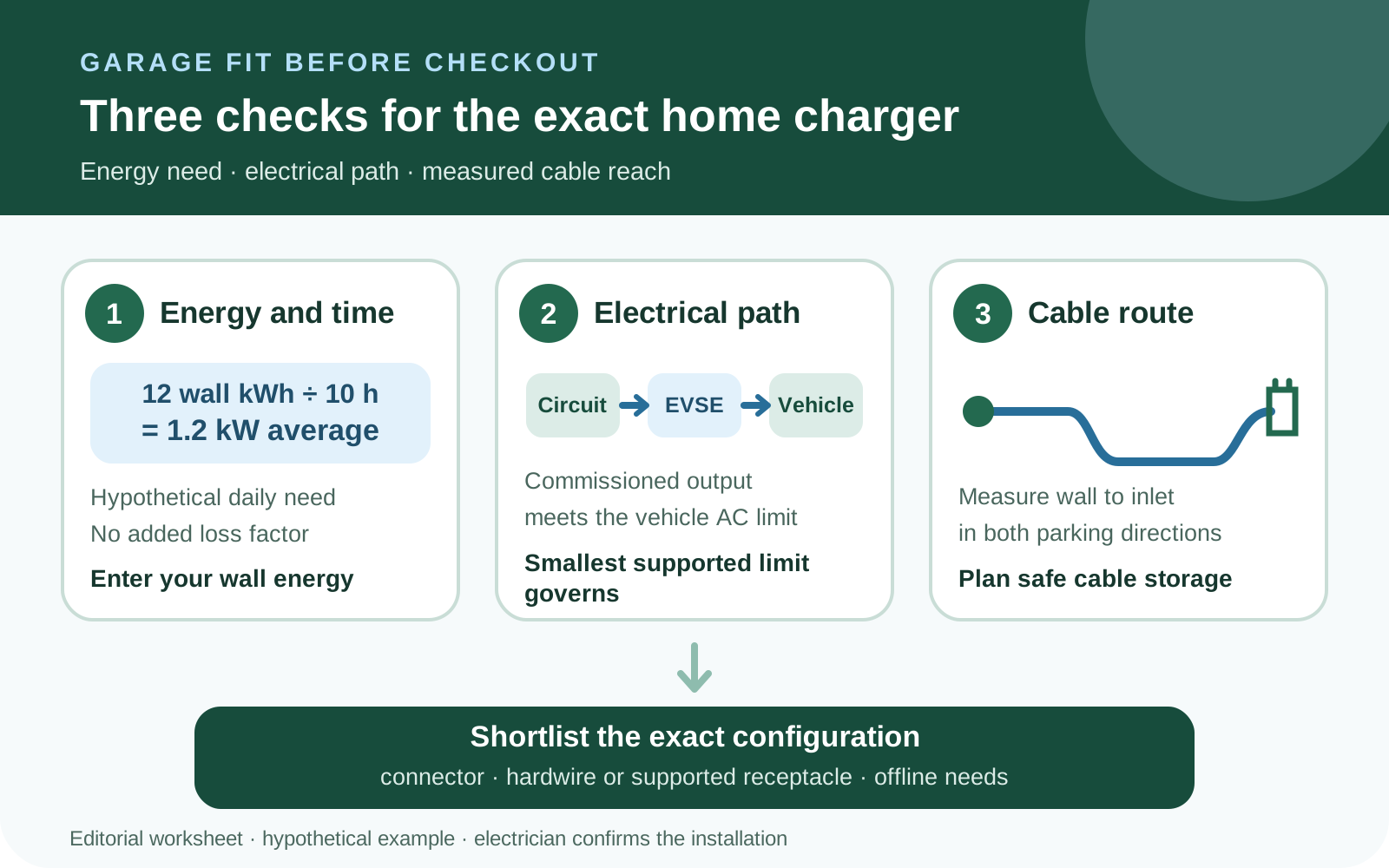
Consider a household driving 40 miles a day at an assumed 0.30 wall kWh per mile. It needs 12 wall kWh restored. Across ten parked hours, 12 ÷ 10 = 1.2 kW average. A second household needing 18 wall kWh in eight hours requires 2.25 kW average. These are planning examples; the energy is already measured at the wall, so do not add charging losses a second time.
Those averages describe the energy job, not a permitted circuit or charger setting. Leave time for delayed arrival and heavier days. A licensed electrician determines the dedicated electrical installation and commissioned output; your car’s onboard AC charger may impose a smaller limit. If a moderate setting covers your demanding day with margin, cable reach and installation cost deserve more attention than the maximum on the box.

Original planning diagram: check energy need, electrical limits and the measured cable route before choosing a US home charger. The wall-energy calculation is hypothetical. ev.guru · AI-assisted planning diagram · Original editorial illustration
Will a higher current save useful time?
An idealized 240-V comparison makes the trade-off clearer. If the full commissioned current is available and the car can accept it, 32 A corresponds to 7.68 kW and 48 A to 11.52 kW. Restoring 18 wall kWh would take about 2 hours 21 minutes versus 1 hour 34 minutes. The difference is roughly 47 minutes; both fit comfortably inside an eight-hour overnight window.
Now assume the car’s onboard AC limit is 7.2 kW. Both installations are limited to that lower power, so the same 18 wall kWh takes 2 hours 30 minutes in either case. These are energy-divided-by-constant-power examples, not measured charge times. Voltage, the vehicle, load sharing and operating conditions can reduce actual power. Because the energy is measured at the wall, losses are already within the assumed 18 kWh.
Pay for additional capacity when it solves a real deadline or a planned second-EV requirement. Otherwise, compare the lower-current installed quote first. The electrician must select a supported installation and commission the output; these examples are not instructions to change a breaker, wiring or charger setting.
Tesla Universal: a mixed-connector household
Shortlist the Universal Wall Connector if you regularly park both NACS and J1772 vehicles and want an integrated adapter at one hardwired unit. Check each vehicle’s guidance and both parking positions. The connection arrangement is convenient only if the cable reaches without strain.
The compared US retail configuration has a 24-ft cable. Tesla’s datasheet also lists a 13.1-ft suffix: 1734412-02-X is the 24-ft version and 1734412-03-X is shorter. Confirm the exact unit and current order availability before buying; a family-name match alone does not establish cable length.
The cited documents do not use the same approval description: Tesla’s September 2023 datasheet lists cULus, while its online specification page lists ETL/cETL. Match the approval mark and documentation to the actual unit supplied. We have not independently certified either configuration, and the document difference alone does not establish a safety defect.
- Vehicle connection
- NACS handle with integrated J1772 adapter
- Output
- 12–48 A; up to 11.5 kW at 240 V
- Installation
- Hardwired; nominal 200–240 V single phase
- Cable
- 24 ft for the compared US retail configuration
- Enclosure and approvals
- Type 3R; cited Tesla documents differ on cULus versus ETL/cETL — confirm the supplied unit
- Connected functions
- Tesla app; 2.4 GHz Wi-Fi for updates, diagnostics and controls
- Warranty
- Four years for residential use, subject to Tesla’s terms
ChargePoint Home Flex: J1772 and installation choice
Shortlist the CPH50 J1772 version when its 23-ft cable is useful and you want to compare a hardwired installation with the manufacturer’s documented plug options. This comparison does not transfer those connector details to the separate NACS version.
The maximum is 50 A, but a compatible car and electrical design are required to use it. ChargePoint documents plug-in use only at 32 A on a 40-A circuit or 40 A on a 50-A circuit. Other published current settings require hardwiring. Have the electrician select the exact product configuration; a matching-looking outlet is not proof of a suitable installation.
- Vehicle connection
- Fixed J1772 cable on the compared CPH50
- Output
- 16/24/32/40/48/50 A; up to 12 kW at 240 V
- Installation
- Hardwire or exact NEMA 6-50/14-50 plug version; 208/240 V single phase
- Cable
- 23 ft; manufacturer replacement-cable option
- Enclosure and certifications
- Type 3R; UL/cUL and ENERGY STAR as published by ChargePoint
- Connected functions
- App and Wi-Fi; installer amperage setup over Bluetooth without Wi-Fi
- Warranty
- Three-year limited parts warranty
Lectron: V-BOX Pro gone from the US store, NEXUS replaces it
Update, October 28, 2026: Lectron’s US store no longer lists the V-BOX Pro, and its former product page now redirects to the NEXUS collection. NEXUS J1772 is sold as a 48 A hardwired version (11.5 kW) and a 40 A NEMA 14-50 version, each with a 23-ft cable, at a listed $419.99. The product pages call the units ETL listed to UL 2594, UL 2231 and UL 2251, name Energy Star and FCC certification, and give a three-year warranty. App control belongs to the separate NEXUS Pro, listed at $449.99 as a pre-sale shipping in late November.
We have not yet reviewed a NEXUS manual or matched an independent listing record to the exact model, so NEXUS is a candidate for your shortlist, not a recommendation. Its 23-ft cable removes the main limitation of the V-BOX Pro below. Ask the seller for the manual and the model-specific listing, and have your installer check the commissioned current for the version you order. We removed our former V-BOX Pro affiliate link when the product disappeared from the US store.
The section below describes the discontinued V-BOX Pro as we reviewed it in September. It remains useful only if you already own one or are offered one elsewhere. The compared unit was the J1772 V-BOX Pro WiFi App Version described in manual v42. It is separate from the NACS, legacy V-BOX and NEXUS products. It suited installations where a measured 16-ft cable path worked and its supported plug or permanent hardwire arrangement fit.
One purchase question remained open in September: Lectron’s product page used both certification and compliance wording for UL/ETL standards. Manual v42 also displays an ETL mark. We have not matched an independent listing record to this exact unit. Ask for the model-specific record and have the installer review it; these manufacturer statements do not by themselves verify the model’s independent listing.
Lectron’s current US policy gives qualifying standard products a two-year limited warranty and NEXUS products a three-year limited warranty, with purchase-channel and exclusion conditions. Do not transfer the NEXUS term to a V-BOX Pro.
Check returns before commissioning, too. Lectron’s policy requires ordinary returns within 30 days to be unused, undamaged and in the original packaging; the customer normally pays return shipping. A warranty claim for a defect is a different process. Ask who bears removal and reinstallation costs if something goes wrong, rather than assuming a product warranty repays the entire installation.
- Vehicle connection
- Discontinued in the US store: fixed J1772 cable; WiFi App Version, manual v42
- Output
- 16/32/40/48 A; up to 40 A plugged in or 48 A hardwired
- Installation
- NEMA 14-50 or permanent hardwire
- Cable
- 16 ft
- Electrical input
- 208–240 V AC, 50/60 Hz
- Connected functions
- Lectron app with Bluetooth/Wi-Fi setup, scheduling and usage controls
- Warranty
- Two-year limited warranty for qualifying current purchases
Compare the installed project, including cable reach
Ask each installer to quote the same scope: available service capacity, dedicated circuit, cable run, breaker and protective equipment, mounting location, outdoor exposure, commissioned output, permit or inspection, and any panel work. Include the device, installation, tax and any shipping when comparing totals. A low device price can be outweighed by a difficult cable run or electrical work.
Tesla’s compared unit is hardwired. ChargePoint offers the specific plug and hardwire options described above. Lectron sells NEXUS as separate 40 A NEMA 14-50 and 48 A hardwired versions. For the older V-BOX Pro, its manual limited the plug configuration to 40 A and warned against returning a converted unit to NEMA-plug use because the conversion can compromise the plug. Plan the intended long-term arrangement before ordering.
Measure from the proposed wall mount to the vehicle inlet with the car parked in both normal directions. Include the actual route around obstacles and safe cable storage. A stated 24, 23 or 16 feet is not the usable straight-line distance across your garage. With two cars, test both positions and decide whether moving cars or sharing a cable is acceptable.
Keep the quotes alongside the product cards. Ask what changes if the installer commissions a lower current, relocates the unit or adds a second EV later. You then compare the cost of a working household setup instead of treating an advertised maximum as a benefit you will necessarily use.
A cheaper charger can cost the same installed
Compare complete quotes before choosing hardware. The two hypothetical US-dollar offers below cover the same charging need, but have different device prices and installation work. They are not quotes for Tesla, ChargePoint or Lectron, and the amounts are not current market prices. The electrician must first confirm that both proposed designs meet your requirements.
Quote A’s charger costs $250 less, but its installation costs $250 more. Both projects total $1,400. That is why a device discount should not decide the order before the cable route and electrical work are assessed. Replace each line with your actual quote; tax treatment and permit fees vary by location. Electricity, financing, repairs, any future fees and incentives are excluded from this example.
| Included item | Quote A | Quote B |
|---|---|---|
| Charger | $350 | $600 |
| Electrical work and commissioning | $900 | $650 |
| Permit and inspection | $100 | $100 |
| Tax and shipping allowance | $50 | $50 |
| Installed total | $1,400 | $1,400 |
Separate internet features from shared electrical capacity
An app schedule, a fixed current setting and dynamic load management solve different problems. Ask which functions keep working after a router change, loss of internet, account transfer or a cloud outage. Decide whether remote controls are essential to daily charging or simply convenient.
ChargePoint explicitly says a saved schedule continues when Wi-Fi disconnects, and its installer flow supports amperage setup over Bluetooth. Tesla’s current support page directs owners to register the unit and connect it to home Wi-Fi for app use; that does not establish every operating state without internet. Lectron describes default plug-and-charge and a separate Wi-Fi-failure indication; that is also narrower than a promise covering all cloud or account failures.
Tesla’s Universal installation manual documents Group Power Management for up to six compatible Wall Connectors within one commissioned total-current limit. Six is the group-size ceiling, not a claim that a home can supply six full-power units or that each receives 48 A simultaneously. The installer establishes the available total.
An equivalent dynamic multi-unit arrangement was not established from the ChargePoint and Lectron sources reviewed here. For two EVs or constrained service, ask for a named load-management design, its supported hardware and what happens if communication fails. A nighttime schedule alone does not establish that total household demand will stay within the electrical design.
Finish the order check
Choose the configuration with the fewest unresolved questions for your car and home. Use this list with the seller and electrician before committing to the equipment or installation.
- Record each vehicle’s model year, AC inlet and onboard AC limit.
- Calculate required wall energy and the realistic overnight parking window.
- Obtain a written electrical plan and installed quote, including any required permit or inspection.
- Confirm the exact product, connector and part suffix, rather than only the family name.
- Measure the cable route in every regular parking position and plan storage.
- Confirm hardwire or the exact supported receptacle configuration and commissioned current.
- Ask which functions survive router, internet or account changes, and how ownership transfers.
- For multiple EVs, require a named load-management design and total-current allocation.
- Check the model-specific certification record, warranty, return terms and current total price before ordering.
Sources & further reading
- Tesla Shop — Universal Wall Connector ↗
- Tesla — Universal Wall Connector specifications ↗
- Tesla — Universal Wall Connector datasheet ↗
- Tesla — Wall Connector troubleshooting ↗
- Tesla — Universal Wall Connector Group Power Management ↗
- ChargePoint — Home Flex installation FAQ ↗
- ChargePoint — Home Flex before you buy ↗
- ChargePoint — Home Flex brochure ↗
- Lectron — V-BOX Pro J1772 WiFi manual v42 ↗
- Lectron — NEXUS collection (the former V-BOX Pro product URL redirects here since October 2026) ↗
- Lectron — US return and limited-warranty policy (two years standard, three years NEXUS) ↗
- Lectron — NEXUS Level 2 J1772, 48 A hardwired, 23-ft cable (checked October 28, 2026) ↗
- Lectron — NEXUS Pro Level 2 J1772 with app control, pre-sale (checked October 28, 2026) ↗
Check current terms and details at the linked sources before deciding.